
UPS सिर्फ Backup के लिए नहीं: बिजली के झटकों, Sensitive Devices और Low Load के लिए सही UPS क्यों जरूरी है?
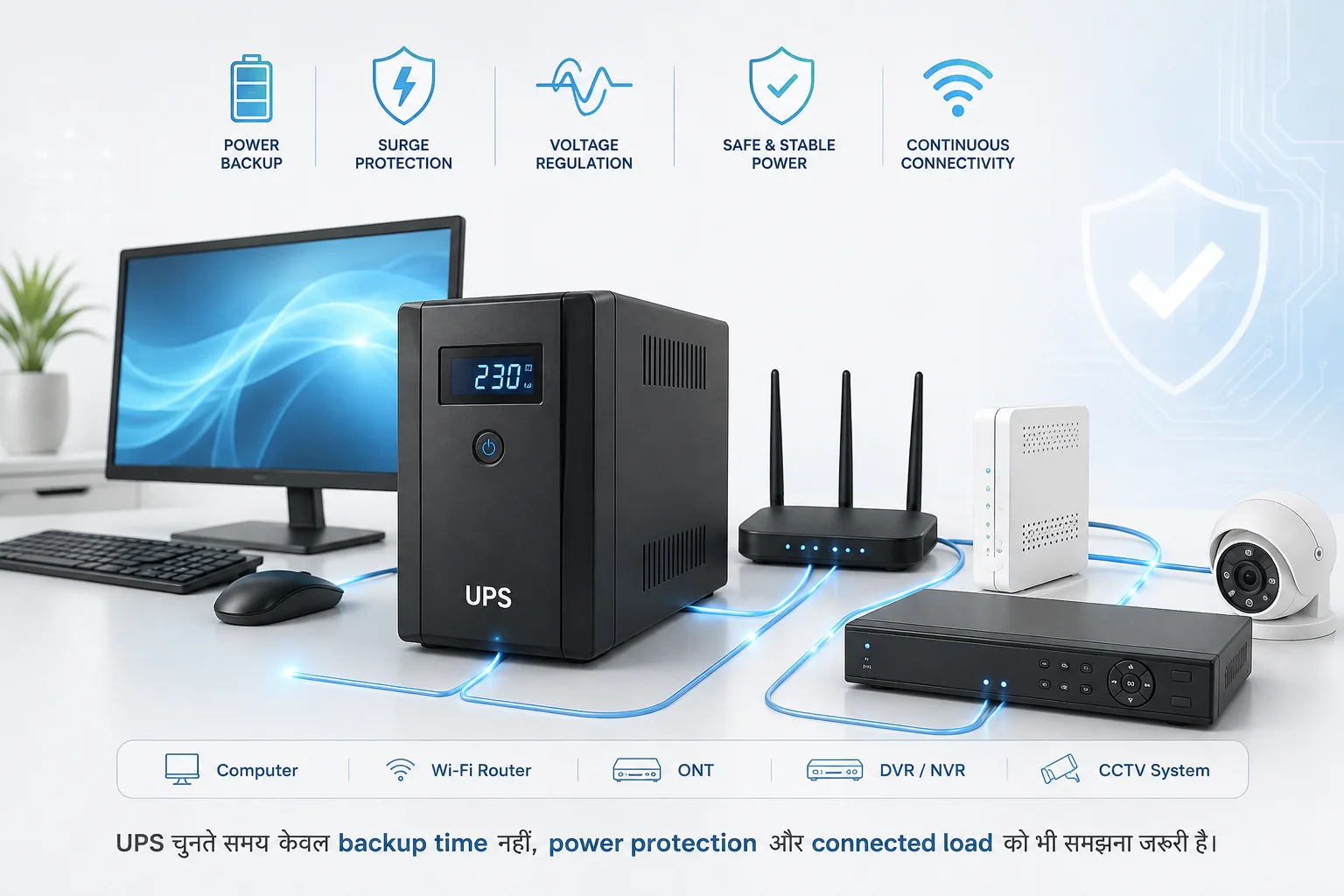
UPS का काम सिर्फ बिजली जाने पर Backup देना नहीं है
जब हम UPS की बात करते हैं तो सबसे पहले दिमाग में एक ही बात आती है:
“Light चली जाए तो Computer कुछ देर चलता रहे।”
यह UPS का एक महत्वपूर्ण काम जरूर है, लेकिन UPS का उपयोग केवल backup के लिए करना उसकी पूरी भूमिका को समझना नहीं है।
Computer, Router, Wi-Fi equipment, DVR/NVR, CCTV system और दूसरे electronic devices के लिए बिजली की quality भी महत्वपूर्ण होती है। Voltage fluctuation, surge और अचानक power interruption जैसे situations equipment के लिए समस्या पैदा कर सकते हैं।
इसलिए UPS खरीदते समय केवल यह देखना पर्याप्त नहीं है कि:
“Backup कितने मिनट मिलेगा?”
यह भी देखना चाहिए:
- UPS किस प्रकार की power protection देता है?
- Surge protection उपलब्ध है या नहीं?
- Voltage regulation की सुविधा है या नहीं?
- Connected equipment के लिए UPS suitable है या नहीं?
- Low-load पर UPS का behavior कैसा है?
- क्या UPS बहुत कम load पर automatic shutdown कर सकता है?
Quick Answer
अगर UPS का उपयोग केवल backup के लिए नहीं बल्कि sensitive electronic equipment को power disturbances से बचाने के लिए किया जा रहा है, तो UPS की specifications को ध्यान से देखना चाहिए।
विशेष रूप से Router, DVR/NVR या networking equipment जैसे low-power devices को UPS से जोड़ते समय यह verify करना जरूरी है कि UPS का minimum load requirement या low-load shutdown behavior क्या है।
कई UPS designs में बहुत कम load होने पर automatic shutdown जैसी functionality हो सकती है। इसलिए “UPS की capacity बड़ी है, इसलिए छोटा load भी हमेशा चलेगा” मान लेना सही नहीं है।
UPS क्या करता है?
UPS यानी Uninterruptible Power Supply ऐसा device है जो connected equipment को बिजली की interruption के दौरान battery backup दे सकता है। UPS के design और model के अनुसार power conditioning, voltage regulation और surge protection जैसी सुविधाएँ भी उपलब्ध हो सकती हैं।
लेकिन सभी UPS समान नहीं होते। इसलिए किसी particular feature को खरीदने से पहले उस model की specification और manufacturer documentation देखना जरूरी है।
1. Backup के अलावा Power Protection क्यों महत्वपूर्ण है?
मान लीजिए आपके office में computer, router या DVR लगा हुआ है। अगर बिजली अचानक चली जाती है, तो backup मिलना उपयोगी है।
लेकिन power-related problems केवल power cut तक सीमित नहीं हैं।
Voltage fluctuation या transient surge जैसी परिस्थितियां भी electronics के लिए महत्वपूर्ण हो सकती हैं। इसलिए UPS चुनते समय केवल battery backup time देखना पर्याप्त नहीं है।
Backup + Power Protection + सही UPS design को साथ में देखना चाहिए।
2. Lightning और Surge Protection को समझना जरूरी है
यहां एक महत्वपूर्ण distinction समझना जरूरी है:
हर UPS lightning protection device नहीं होता।
कुछ UPS में surge protection जैसी सुविधाएं हो सकती हैं, लेकिन direct lightning strike से equipment की पूर्ण सुरक्षा की guarantee किसी सामान्य UPS से नहीं माननी चाहिए।
Building और electrical system में proper earthing, surge protection devices (SPD) और आवश्यकता के अनुसार lightning protection system भी महत्वपूर्ण हो सकते हैं।
इसलिए अगर customer का मुख्य concern lightning या severe electrical surge है, तो केवल UPS खरीदना पर्याप्त solution नहीं मानना चाहिए।
UPS + Proper Earthing + Appropriate Surge Protection एक अधिक complete approach हो सकती है।
3. Router या DVR को UPS से जोड़ने में एक practical problem
यह situation बहुत common है।
Customer के पास UPS है और वह उसमें केवल:
- Wi-Fi Router
- ONT/Modem
- DVR/NVR
- CCTV networking equipment
जैसे low-power devices connect करता है।
Customer सोचता है:
“UPS की capacity 600VA या 1000VA है, तो router तो आसानी से चलना चाहिए।”
Capacity देखकर यह conclusion हमेशा सही नहीं होता।
4. Low Load होने पर UPS क्यों बंद हो सकता है?
कुछ UPS models में minimum load या low-load detection logic हो सकता है। यदि connected equipment बहुत कम power consume कर रहा है, तो UPS उसे insufficient load मानकर battery mode में automatic shutdown कर सकता है।
उदाहरण के लिए केवल एक छोटा router UPS से जुड़ा है। UPS की total capacity की तुलना में यह load बहुत छोटा है। अगर उस particular UPS का low-load shutdown threshold इस load से ज्यादा है, तो battery backup अपेक्षित तरीके से नहीं मिल सकता।
इसलिए UPS चुनते समय केवल Maximum VA/Watt capacity नहीं, बल्कि minimum load behavior भी देखना चाहिए।
5. Low Load का मतलब यह नहीं कि UPS खराब है
अगर UPS केवल router या DVR जैसे छोटे device पर automatic shutdown कर देता है, तो तुरंत यह निष्कर्ष नहीं निकालना चाहिए कि UPS खराब है।
हो सकता है कि UPS का design ही very-low-load operation के लिए suitable न हो।
इसीलिए low-power applications के लिए UPS का selection अलग तरीके से करना चाहिए।
6. Router + DVR + ONT का load क्यों जोड़ना useful हो सकता है?
कुछ installations में customer के पास अलग-अलग low-power devices होते हैं:
- Internet ONT
- Wi-Fi Router
- DVR/NVR
- Network Switch
- CCTV accessories
इन सबका combined load एक single router के load से ज्यादा हो सकता है।
लेकिन इसका मतलब यह नहीं है कि कोई भी UPS automatically suitable होगा। पहले total power consumption और UPS की minimum/maximum load specifications verify करनी चाहिए।
7. UPS खरीदते समय केवल VA क्यों नहीं देखें?
Customer अक्सर पूछता है:
“1000VA UPS कितने Computer चला सकता है?”
यह सवाल incomplete है।
सही calculation में देखना चाहिए:
- Actual load in watts
- UPS VA rating
- UPS power factor
- Battery capacity
- Expected backup time
- Connected equipment type
- Minimum load requirement
- Surge protection features
- Voltage regulation/features
8. CCTV में UPS का महत्व
CCTV system में UPS का काम केवल DVR को बिजली जाने पर कुछ समय चलाना नहीं है।
एक typical CCTV setup में कई components हो सकते हैं:
- DVR/NVR
- Cameras
- Network Switch
- Router
- PoE equipment
- Monitor
अगर backup केवल DVR को दिया गया है लेकिन networking equipment और आवश्यक camera infrastructure बंद हो गया, तो system का practical benefit सीमित हो सकता है।
इसलिए CCTV backup design करते समय पूरे system के critical components identify करना चाहिए।
9. Router के लिए UPS चुनते समय क्या देखें?
अगर उद्देश्य केवल Router/ONT को backup देना है, तो सामान्य high-capacity desktop UPS खरीदना हमेशा सबसे practical solution नहीं हो सकता।
Router/ONT के लिए ऐसे backup solutions उपलब्ध हैं जो low-power DC devices के लिए specifically designed होते हैं।
इनका selection करते समय voltage, current, connector और device compatibility verify करना जरूरी है।
गलत voltage या polarity वाला power solution router को नुकसान पहुंचा सकता है।
10. Computer UPS और Router Backup एक ही चीज नहीं हैं
Computer के लिए इस्तेमाल होने वाला UPS और Router/ONT के लिए designed DC backup solution अलग applications हो सकते हैं।
Computer UPS में AC output दिया जाता है, जबकि कई networking backup devices DC output देते हैं।
इसलिए customer को केवल “UPS” शब्द देखकर product नहीं चुनना चाहिए।
11. UPS खरीदने की Practical Checklist
- Load कितना है? Actual watts में calculate करें।
- Device कौन सा है? Computer, Router, DVR/NVR या networking equipment?
- Backup कितना चाहिए? Required backup time तय करें।
- Minimum load requirement क्या है? Low-load application में इसे जरूर check करें।
- Surge protection है? Manufacturer specification देखें।
- Voltage regulation है? अगर आवश्यक है तो verify करें।
- Battery replacement/support कैसा है?
- Proper earthing उपलब्ध है?
एक practical example
मान लीजिए किसी दुकान में केवल Wi-Fi Router और ONT को backup देना है। Customer के पास एक सामान्य desktop UPS है।
UPS की capacity काफी ज्यादा है, लेकिन connected load बहुत कम है। अगर उस UPS में low-load shutdown behavior है और load required threshold से नीचे चला जाता है, तो UPS battery mode में अपेक्षित समय तक नहीं चल सकता।
ऐसी situation में सिर्फ बड़ा UPS खरीदना समाधान नहीं है। पहले यह देखना चाहिए कि selected UPS low-power application के लिए suitable है या नहीं।
Lightning Protection के मामले में क्या करें?
Lightning protection को UPS का replacement नहीं समझना चाहिए।
Proper electrical installation में:
- Good earthing
- Appropriate surge protection device
- Proper electrical wiring
- UPS where required
- Network/CCTV lines के लिए suitable protection जहां आवश्यक हो
जैसे उपाय situation के अनुसार महत्वपूर्ण हो सकते हैं।
विशेष रूप से CCTV installation में outdoor cameras और long cable runs वाले systems में surge/lightning protection को अलग से consider करना चाहिए।
Infotech Solutions की Practical Recommendation
UPS खरीदते समय हमारा सुझाव है कि केवल यह न पूछें:
“कितने VA का UPS है और कितने मिनट backup देगा?”
पहले यह बताएं कि UPS पर क्या चलाना है:
- Computer
- Printer
- Router
- ONT
- DVR/NVR
- CCTV system
- Network Switch
- या पूरा office setup
इसके बाद actual load, required backup time, low-load behavior और available protection features देखकर UPS चुनना ज्यादा practical approach है।
और अगर requirement lightning/surge protection की है, तो UPS के साथ proper earthing और appropriate surge protection arrangement को भी consider करना चाहिए।
Final Verdict
UPS को केवल “light जाने पर battery backup” समझना अधूरा है।
सही UPS selection में backup के साथ power protection, connected equipment, load characteristics और application को समझना जरूरी है।
विशेष रूप से Router, DVR/NVR और अन्य low-power devices के लिए low-load behavior को ignore नहीं करना चाहिए। कुछ UPS models बहुत कम load पर automatic shutdown कर सकते हैं।
और lightning protection के लिए केवल UPS पर निर्भर रहने के बजाय proper earthing और appropriate surge protection को भी system design का हिस्सा बनाना चाहिए।
सही UPS वह नहीं है जिसकी VA rating सबसे ज्यादा हो; सही UPS वह है जो आपके actual equipment, load और protection requirement के लिए सही तरह से designed हो।
Found this guide useful?
More guides
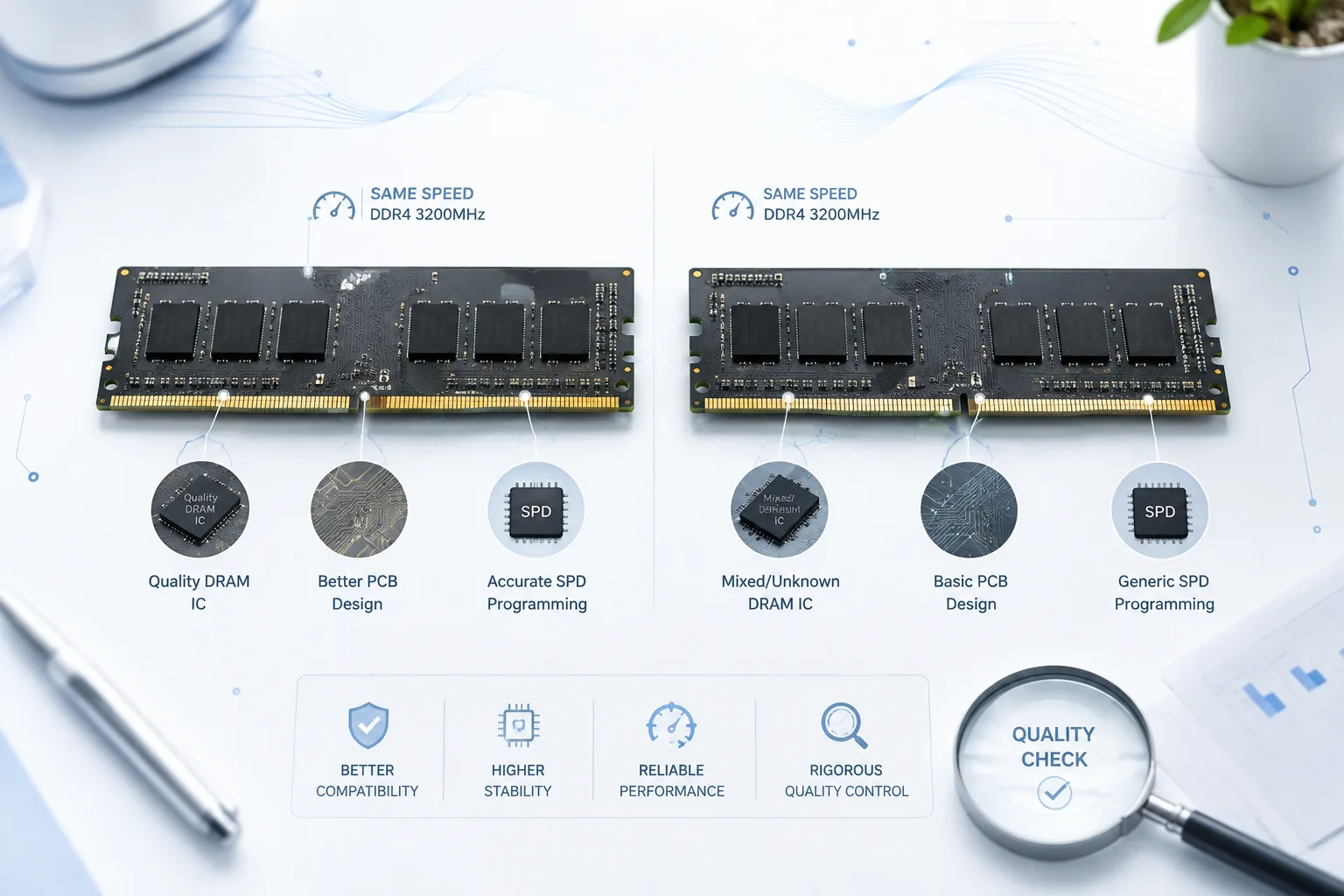
RAM की Speed समान हो सकती है, लेकिन उसकी Quality समान नहीं होती—जानिए क्यों Chinese/Generic RAM और Branded RAM में असली अंतर सिर्फ नाम या कीमत का नहीं होता।
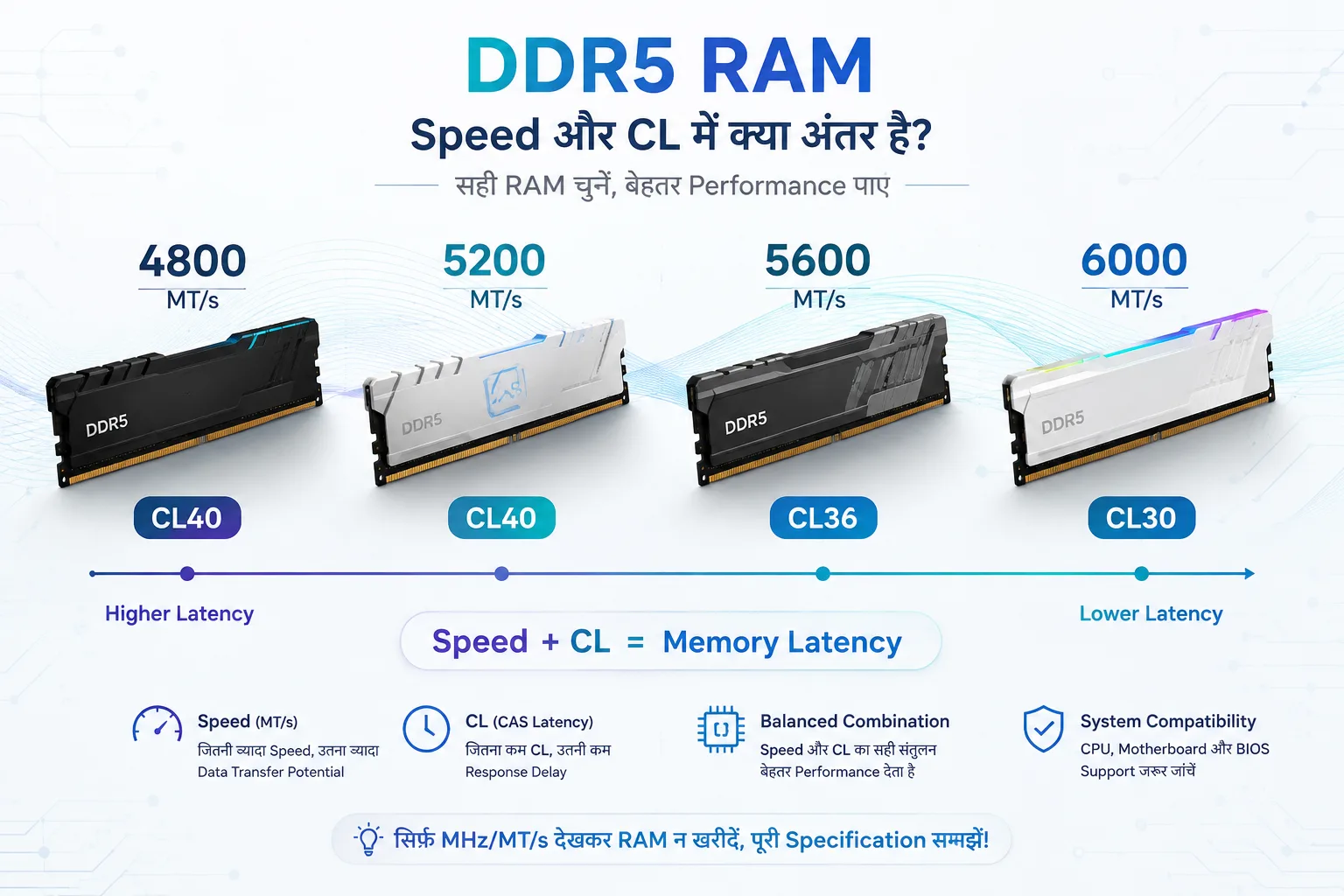
DDR5 RAM में 4800, 5200, 5600 और 6000 Speed का क्या फर्क है? CL28, CL30, CL36, CL40 और CL46 को आसान भाषा में समझिए